
SharePoint External Sharing Scanner
Detect external SharePoint sharing before it becomes a risk
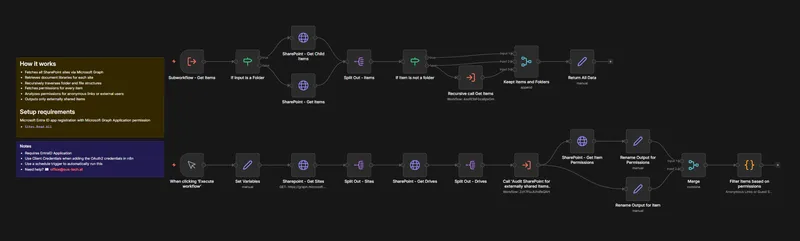
Automatically identify files and folders in SharePoint that are shared with external users or via anonymous links. This workflow scans your SharePoint environment and provides a clear structured overview of all externally accessible items.
What this workflow solves
External sharing in SharePoint often grows over time through collaboration project work or temporary access links. Without regular audits these shares can remain active long after they are needed. This workflow automates detection of external access and anonymous access to reduce security risk and support compliance.
Key features
- Fetches all SharePoint sites via Microsoft Graph
- Fetches all document libraries
- Recursively scans drives folders files
- Retrieves permission metadata for each item
- Detects external sharing including
- Anonymous sharing links
- External users
- Guest users based on login name or email domain
- Filters results to items with external access or anonymous access
- Normalizes results into a consistent structure including
- Item name
- Item type file or folder
- Site ID
- Library ID
- Drive ID
- Direct SharePoint URL
- Last modified date
- Sharing type anonymous or external user
- Permission roles
- Link details
- Produces clean data for reports exports follow-up workflows
How it works
- Fetches all SharePoint sites via Microsoft Graph
- Retrieves document libraries for each site
- Recursively traverses folder and file structures
- Fetches permissions for every item
- Analyzes permissions for anonymous links or external users
- Outputs only externally shared items
Setup requirements
Microsoft Entra ID app registration with Microsoft Graph Application permission
- Sites.Read.All
In n8n
- Create Microsoft Graph OAuth2 credentials Client Credentials flow recommended
- Assign credentials to all Microsoft Graph HTTP Request nodes
- Update the Set Variables node
- tenantDomains list of internal domains used to identify external users
Notes
- This workflow is read only and does not modify SharePoint permissions
- For continuous monitoring replace the manual trigger with a Schedule Trigger daily or weekly
- The workflow accesses metadata only permissions identities links and never reads file contents
Ready to get started?
Grab the template or talk to us about the best implementation.