
Confluence - Permissions Audit
Identify and mitigate public access risks in Confluence by auditing anonymous permissions and public links across selected spaces.
What this workflow solves
Publicly accessible Confluence content can easily go unnoticed and lead to unintended data exposure. This workflow provides visibility into anonymous access and public links, enabling teams to assess risk and take corrective action early.
Key features
- Detects public exposure risks in Confluence spaces, including:
- Anonymous access permissions at space level
- Whether public links are enabled
- Pages with active or blocked public links
- Uses Confluence REST API v2 together with the Atlassian GraphQL API
- Generates a consolidated per-space report containing:
- Anonymous access permissions
- Public link status
- Pages with public links (title, status, URL, enabled-by user)
- Ideal for:
- Security audits
- Compliance reviews
- Data leakage prevention
How it works
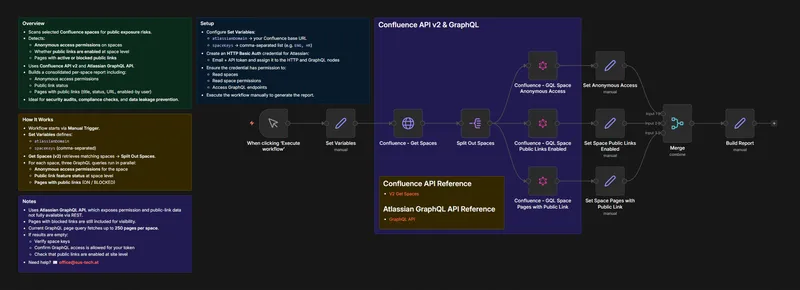
- The workflow is triggered manually.
- Configuration is handled via a Set Variables node:
atlassianDomainspaceKeys(comma-separated)
- Get Spaces (v2) retrieves matching spaces and processes them individually.
- For each space, three GraphQL queries run in parallel:
- Retrieve anonymous access permissions
- Check public link feature status at space level
- Fetch pages with public links (ON / BLOCKED)
- Results are merged and normalized into a single per-space report.
Setup requirements
- Atlassian / Confluence Cloud account
- HTTP Basic Auth credential (email + API token)
- Permissions required:
- Read spaces
- Read space permissions
- Access Atlassian GraphQL endpoints
Notes
- The Atlassian GraphQL API exposes permission and public-link data not fully available via REST.
- Pages with blocked public links are included for visibility.
- The GraphQL page query fetches up to 250 pages per space.
Ready to get started?
Grab the template or talk to us about the best implementation.