
Preventing Unintended Data Exposure: Auditing Public Access in Confluence

In many enterprise Confluence environments, public access is not a deliberate policy decision but an accidental outcome: anonymous permissions and public links get enabled for a short-term need, then quietly persist. The result is sensitive documentation becoming externally accessible without clear visibility until an audit, security review or incident forces the issue.
Public access in Confluence is a governance question
At enterprise scale, Confluence permissions governance is rarely owned by a single person or team. Space admins make local decisions, project teams create new spaces under time pressure and content owners share pages externally "just for a week". Over time, governance becomes distributed and inconsistently applied.
That fragmentation turns public access risk management into a blind spot. Leadership may assume Confluence is internal-only while a handful of spaces allow anonymous access or enable public links. When security or compliance asks, "Which spaces are externally accessible today?", many organizations cannot answer quickly and with evidence.
The business risk is tangible:
- Data leakage prevention: roadmaps, customer details, incident retrospectives, supplier contracts, security runbooks
- Regulatory readiness: documentation controls need to be provable, not assumed
- Trust in Confluence: once teams believe sensitive content might be public, they move to shadow documentation in email, PDFs and local drives
In other words, permissions are not just a technical setting. They are an enterprise control.
Where public exposure in Confluence comes from
Public exposure in Confluence can be created through multiple mechanisms that do not always show up in a single admin screen:
- Anonymous access permissions at space level: spaces that allow unauthenticated users to view content
- Public link feature settings: whether a space allows content to be shared via public link
- Page-level public links: pages with active public links, plus pages where links were previously created then blocked
In large environments, these settings are often enabled temporarily:
- A vendor needs access to a spec
- A customer asks for "just one link"
- A project team shares onboarding material externally for a short period
Then the context disappears, but the exposure persists.
This is why unintended exposure often goes unnoticed until:
- an audit requests proof of controls
- a security review attempts to map external sharing
- an incident reveals that information has already been accessible outside the organization
At that point, remediation is reactive, time-boxed and expensive.
Why space-by-space reviews miss it
Most enterprises try to manage Confluence public access with a mix of good intent and brittle processes.
Manual checks by space admins can work for a small instance but break down with dozens or hundreds of spaces. Reviews are inconsistent and edge cases are easy to miss.
Spot audits provide a point-in-time view only. Between audits, new public links can appear and anonymous permissions can be changed again, creating a visibility gap.
Ad-hoc scripts are often hard to maintain and commonly run into API limitations. Not all permission and public-link signals are fully exposed through a single standard REST endpoint, which leads to incomplete reporting and false confidence.
A broader lesson from Confluence governance shows up in adjacent controls too: when governance is fragmented, even "small" inconsistencies become enterprise risk. The same problem appears with stale documentation and unclear ownership, both of which also tend to surface during audits rather than being managed continuously. For a related governance control, see our internal article Maintaining Documentation Compliance: Automating Stale Content Detection in Confluence.
A permissions audit across all spaces
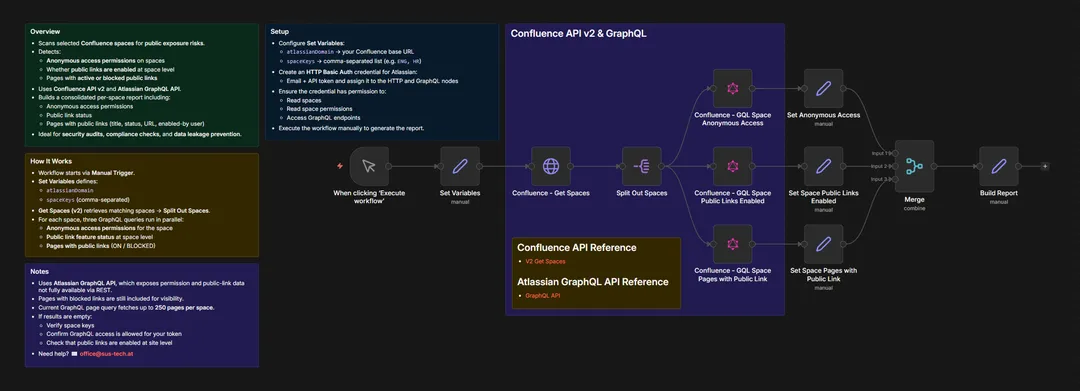
S&S Technologies closes this governance gap with the Confluence - Permissions Audit workflow: a repeatable, centralized audit that produces a consolidated per-space view of public exposure signals.
Instead of relying on distributed manual checks, the workflow highlights, per selected space:
- whether anonymous access permissions exist
- whether public links are enabled at space level
- which pages have active public links
- which pages have blocked public links, still useful for governance visibility and follow-up
The goal is not "technical inspection for its own sake". The goal is risk awareness and decision support for security, compliance and governance stakeholders so they can act before information is shared externally.
Automate. Optimize. Scale.
You can also review the solution details here: Confluence - Permissions Audit.
How the audit works
Architecture
The workflow is manually triggered to support predictable, audit-friendly execution. You define the Confluence spaces you want to review, then the workflow:
- retrieves the matching spaces
- processes spaces one by one
- runs parallel queries per space to capture exposure signals
- normalizes results into a consolidated per-space report
This creates a consistent baseline you can re-run during security reviews, compliance preparation or after organizational changes.
Integrations
The audit combines two interfaces because relying on one alone often leaves blind spots:
- Confluence REST API v2 for space discovery and supporting data
- Atlassian GraphQL API to retrieve permission and public-link signals not fully available via REST alone
Access requirements:
- Confluence Cloud
- Atlassian API-Token
Automation and AI
This is workflow automation, not an AI-driven control.
The workflow is configured via a Set Variables step, including:
atlassianDomainspaceKeys(comma-separated)
For each space, the workflow executes GraphQL queries in parallel and then consolidates results into a governance-ready report. That approach supports predictable outcomes and repeatable evidence, which matters for compliance and internal controls.
Example Output:
[
  {
    "spaceKey": "PT",
    "anonymousAccess": [
      {
        "permissions": [
          "VIEW_SPACE"
        ],
        "filteredPrincipalSubjectKey": {
          "id": "",
          "displayName": "anonymous"
        }
      }
    ],
    "publicLinksEnabled": "OFF",
    "pagesWithPublicLink": []
  }
]
Security and Governance
The workflow is designed for Confluence security governance and data leakage prevention.
Key governance characteristics:
- Read-focused: built to surface exposure signals for review and remediation planning
- Requires permission to read spaces, read space permissions and access Atlassian GraphQL endpoints
- Includes pages with blocked public links to help teams understand historical sharing behavior and reduce future recurrence
- Fetches up to 250 pages per space in the GraphQL page query to support consistent reporting in large spaces
This produces a defensible artifact: a consolidated report that shows where risk exists, which enables policy-aligned decisions rather than guesswork.
What the audit changes
Operational Efficiency
A centralized audit replaces slow space-by-space reviews with a repeatable control. In mid-to-large Confluence environments, this reduces the manual review effort of security and platform teams during audit preparation, because the workflow narrows attention to the spaces and pages that actually show exposure signals.
Cost Reduction
Public access checks are recurring work. When they depend on manual effort, costs scale with the number of spaces, reorganizations and audit cycles.
A standardized workflow reduces governance overhead by:
- avoiding ad-hoc, one-off checks
- reducing last-minute "audit scramble" work
- minimizing repeated effort across teams that would otherwise run their own inconsistent reviews
In large deployments, replacing manual spot checks with a repeatable audit routine saves hours of review work every quarter.
Risk and Compliance
The largest benefit is risk reduction.
Consolidated reporting helps you:
- detect where anonymous permissions are present
- identify active public links before sensitive content is shared widely
- demonstrate a repeatable control during security reviews
That supports documentation compliance and proactive data leakage prevention, reducing the probability of an externally accessible page becoming an incident.
Scalability
In distributed environments, governance must scale without linear headcount growth.
This workflow supports enterprise automation by applying the same logic across many spaces using API-driven retrieval and normalized output. As Confluence usage grows, the marginal effort stays low because the control remains consistent and repeatable.
Who needs this view
This approach is designed for stakeholders who need visibility without friction:
- CIOs and IT-Ops leads responsible for enterprise collaboration platforms
- Security and compliance teams preparing documentation compliance reviews and control evidence
- Governance stakeholders who need a centralized view across many spaces
- Service desk managers who rely on Confluence content for ITSM automation and want to avoid accidental public publishing
It also fits broader enterprise automation programs where Confluence governance connects to business process automation, ERP integration and policy enforcement routines.
From a first audit to a routine control
Start with a baseline audit, then turn it into a routine control.
- Select target spaces: begin with high-traffic, customer-facing or high-risk spaces
- Run the workflow using a defined list of
spaceKeysto establish an exposure baseline - Review the consolidated per-space report and classify findings by severity and business impact
- Prioritize remediation: remove anonymous permissions where not required, disable public links where policy prohibits them and address pages with active links
- Pair governance controls for stronger outcomes:
- Ownership Scanner to clarify who is responsible for content
- Stale Page Report to identify outdated documentation
- Permissions Audit to control public exposure risk
Public access auditing should be treated as a core element of Confluence permissions governance. Without ongoing visibility, Confluence can drift from a trusted internal knowledge platform into an unintended public publishing surface.
If you want to implement the workflow, adapt it to your governance model or connect it into wider workflow automation and ITSM automation routines, contact our team at office@sus-tech.at.