
Preventing Outages Before They Happen: Monitoring Application Credentials in Entra ID

How many of your business-critical integrations are one expired client secret away from an unplanned outage? In Microsoft Entra ID, application secrets and certificates can quietly expire and the first signal is often a failed integration and an urgent incident response.
Expired credentials are an operational risk
At enterprise scale, credential lifecycle management is not "just an admin task". It is a reliability, governance and cost issue.
Most organisations run a growing mesh of integrations: ERP integration with finance platforms, ITSM automation between service tools, data syncs to BI, vendor-managed connectors, CI/CD service principals and background jobs that keep customer-facing systems running. Many of these depend on client secrets or certificates stored in Entra ID.
When one credential expires, the blast radius is rarely contained:
- A single failed integration can block order processing, invoicing, user provisioning or incident routing
- Service desks get flooded with symptoms, not root causes
- IT-Ops is forced into emergency rotation under time pressure
- Audit and governance teams lose confidence in the identity control environment
This is why proactive Entra ID credential monitoring is an operational control. It helps prevent outages, supports identity security governance and keeps operations predictable without scaling manual effort.
How an expired secret takes down an integration
Expired client secrets and certificates are a common root cause of unexpected outages and failed integrations. The failure mode is particularly painful because it is silent until the moment it breaks:
- Secrets and certificates have fixed expiration dates
- Integrations typically do not "warn" you, they just start failing authentication
- Ownership is often unclear, especially for legacy apps or vendor registrations
In practice, teams discover the issue after production systems degrade. A preventable maintenance action becomes an incident, a bridge call and a rushed change.
The operational cost is not only the downtime. It is also the context switching and the hours spent tracking down which application registration failed, where it is used and who can rotate it safely.
Why calendars and portal checks fall short
Enterprises usually start with good intentions and lightweight methods:
- Periodic manual checks in the Entra admin portal
- Spreadsheets listing "important" app registrations
- Calendar reminders per team or project
- Ad-hoc PowerShell scripts owned by one person
These approaches break down as the number of app registrations grows and responsibilities become distributed.
Manual checks do not scale. Spreadsheets go stale. Reminders do not capture new credentials created by projects or vendors. One-off scripts often lack consistent reporting, scheduling, access controls and handover.
The result is a familiar pattern: either too much noise (alerts that cannot be acted on) or too little visibility (missed expirations). In both cases, rotation happens reactively instead of as controlled, planned maintenance.
This is also where broader governance gaps show up. When ownership and lifecycle rules are unclear, small oversights accumulate into operational fragility. Our article Why Data and Identity Governance Is Critical for Every Business - and Why Starting Early Matters makes the case that governance is not only a security topic, it is a scalability topic.
An n8n workflow that watches every app registration
S&S Technologies addresses this with the Entra ID - Monitor Application Secrets workflow: an automated, lightweight control that continuously discovers Entra ID application credentials and reports only those expiring within a configurable window.
Instead of replacing existing identity processes, it adds governed automation on top of them to improve visibility and reduce outages. Automate. Optimize. Scale.
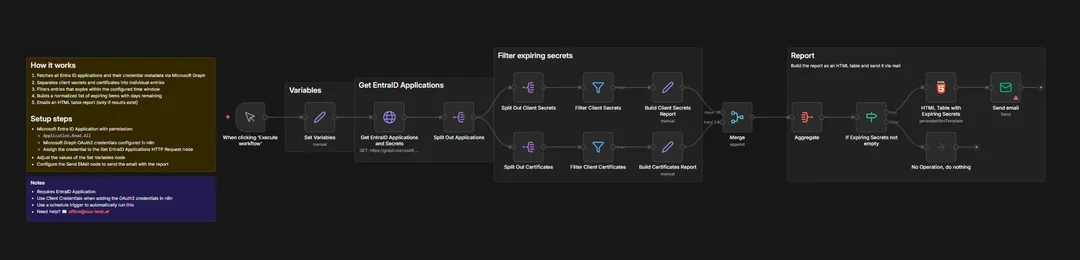
For details, see our solution page: Entra ID - Monitor Application Secrets.
How the workflow finds expiring secrets
Architecture
The workflow runs in n8n and uses Microsoft Graph to fetch Entra ID applications and their credential metadata.
It then:
- Retrieves all application registrations and reads credential metadata
- Separates client secrets (
passwordCredentials) and certificates (keyCredentials) into individual entries - Filters credentials expiring within the next N days (configurable, for example 14)
- Normalizes output into a consistent structure:
- Application name
- App ID
- Credential type (Client Secret or Certificate)
- Credential name and credential ID
- Days remaining
- Generates a sorted HTML report and sends an email only if expiring items exist
This "notify only when action is required" design is crucial for operational adoption. It avoids alert fatigue while still giving teams enough runway to rotate credentials during planned change windows.
For ongoing operations, the manual trigger can be replaced by a schedule trigger (daily or weekly) depending on how quickly your environment changes and how strict your lifecycle requirements are.
Integrations
The primary integration is Microsoft Entra ID via Microsoft Graph. Notifications are delivered by email to a configured recipient, for example:
- IT operations mailbox
- Service owners distribution list
- A shared mailbox used by the service desk
Because the workflow is orchestrated in n8n, it also fits naturally into a broader enterprise automation approach where reporting, approvals and ITSM automation can be layered on later.
Automation and AI
This is practical workflow automation, implemented in n8n: automated discovery, normalization, filtering and reporting of credential expiration risk across Entra ID app registrations.
A key design goal is operational signal quality:
- Continuous discovery avoids blind spots from outdated documentation
- Filtering ensures you only receive reports when remediation is needed
- A consistent report format makes handoffs faster during planned rotations
AI agents are not required for this workflow to deliver value. That said, in a wider enterprise automation setup, AI agents can support triage, routing or suggested ownership when an application registration has unclear accountability.
Example E-Mail notification:

Security and Governance
The workflow reads metadata only: names, IDs and expiration timestamps. It does not access secret values, which reduces sensitive data exposure.
Access is performed through an Entra ID app registration using Microsoft Graph application permissions, typically:
Application.Read.All
Authentication uses OAuth2, with the client credentials flow recommended for stable automation.
From a governance standpoint, this supports least-privilege principles and provides a repeatable control: a consistent, auditable report of upcoming expirations. It also helps enforce credential lifecycle management across teams and vendors without relying on tribal knowledge.
What changes for IT operations
Operational Efficiency
Manual portal checks and spreadsheet tracking are time sinks, especially across dozens or hundreds of app registrations.
Automating discovery and reporting cuts the time spent on checking and consolidating expiration data. The more teams are involved and the more often credentials are rotated, the more it saves. More importantly, it shortens the time from "risk exists" to "rotation planned".
Cost Reduction
Unplanned outages are expensive, even when they are resolved quickly. The cost includes:
- Incident response time for IT-Ops and the service desk
- Delayed business processes (orders, invoices, provisioning)
- Emergency change effort and higher error risk
Proactive monitoring shifts rotation from incident-driven work to scheduled maintenance. For many enterprises, avoiding even one integration outage per quarter can translate to tens of thousands of euros in protected productivity and reduced disruption.
Risk and Compliance
Continuous visibility decreases the probability of credential-expiration outages and strengthens identity security governance.
It also supports audit readiness: you can demonstrate that expiring credentials are detected systematically, reported consistently and handled within defined windows.
Scalability
As app registrations grow, manual approaches scale linearly in effort and risk.
This workflow scales differently: the scan and report remain consistent whether you have 20 apps or 200. That is the core benefit of enterprise automation, adding control without adding headcount at the same rate.
Who benefits
This approach is designed for:
- CIOs and IT-Ops leads accountable for service reliability and operational resilience
- Service desk managers coordinating incident prevention and readiness
- CFOs looking to reduce downtime-related cost and reactive firefighting
It is especially relevant if you have many Entra ID app registrations spread across multiple teams, projects and vendors, where ownership and documentation are not always clear.
How to start monitoring
To operationalise Entra ID credential monitoring quickly:
- Define your alert window (for example, 14 days)
- Identify the notification mailbox or distribution list (IT-Ops, service owners or service desk)
- Run the workflow in n8n and switch to a schedule trigger for continuous monitoring (daily or weekly)
- Add rotation ownership: decide who acts on the report and how changes are planned
Credential monitoring is best treated as a preventive control, not a reactive clean-up task. When you know what will expire before it breaks, teams can rotate credentials calmly, keep integrations stable and reduce outage risk.
Contact our team to implement and operationalize Entra ID credential monitoring in your environment: Contact our team at office@sus-tech.at