
How to Run LLMs Locally

Why small local models are worth a look
AI is now standard for service desks and ops teams. Yet every cloud call costs three things: latency, money and compliance risk. Small local models change this: your data stays with you and there are no fees per token.
Why cloud round-trips slow automation down
Every call to a hyperscaler adds a round trip over the internet. With thousands of daily automations that means:
- Higher cost: per-token fees for every call
- Uncertain compliance: the GDPR frowns on cross-border transfers
- Development effort: shifting APIs, rate limits, vendor lock-in
Local LLMs remove those blockers - but which model? What GPU? How do you expose an API for n8n?
Ollama and n8n on your own hardware
S&S Technologies bundles Ollama (a lightweight model server) with hardened n8n workflow runners. Ollama hosts models on-prem; n8n orchestrates prompts, context windows and post-processing. Together they run your automations under your own control. Automate. Optimize. Scale.
Choosing, sizing and installing models
1. Model Classes & Use-Cases
| Model class | Typical size | Best for | Example prompt |
|---|---|---|---|
| SLMs (Small Language Models) | 3-7 B params | Real-time chat, ticket triage | "Summarise this ticket in 20 words and assign a priority." |
| Vision-capable LLMs | 7-13 B | OCR, screenshot analysis, invoice QA | "Tell me if this invoice is missing a PO number." |
| "Thinking" Models (reasoning-tuned) | 7-13 B with larger context | Root-cause analysis, multi-step automations | "Given these log excerpts, hypothesise the fault and propose next steps." |
2. Choosing Models
- Phi-3-mini-4K-instruct (3.8 B): small, fast SLM for chat / classification
- Gemma-2-9B-it: general-purpose model with 8 K context for heavier tasks
- Llava-1.6-7B: adds image understanding, for example for GUI screenshot QA
- OpenHermes-2.5-Mistral-7B: Mistral 7B fine-tuned on instructions for general tasks
Tip: Keep one SLM plus one vision model always resident; spin up a heavier "thinking" model only when needed.
3. Hardware Checks
- CPU-only pilot: Modern 8-core laptop; enough for first tests, but answers come slower than on a GPU
- GPU minimum: NVIDIA RTX 4060 (8 GB VRAM) or better, so each of the models above fits into GPU memory
- RAM: enough for the operating system and the models you keep loaded; more if you hot-swap several
- Disk: the models above take 2-6 GB each as Ollama downloads them (Ollama library) - store them on NVMe for fast loads
4. Installing Ollama & n8n - quick links
# macOS / Linux
curl -fsSL https://ollama.com/install.sh | sh
# then
ollama pull gemma2:9b
# Ollama now listens on http://localhost:11434
Full guide: read the Ollama installation docs.
Running n8n next to Ollama is just as simple:
- Self-host (Docker): follow the n8n Docker quick-start
- Cloud trial: spin up a trial instance on n8n Cloud
Either route works - the only difference is where the workflow engine lives.
5. Wiring Into n8n - built-in AI nodes
| # | Action | Why it matters |
|---|---|---|
| 1 | In Credentials → Ollama, set Base URL to http://localhost:11434 (or the container name). Drop an Ollama Model node (completions) or Ollama Chat Model node (chat). |
Native node = no custom HTTP calls and richer error handling |
| 2 | Single-shot prompts: wrap the model in Basic LLM Chain.Multi-tool reasoning: feed the model into an AI Agent and attach tool nodes (Web search, SQL, HTTP...). | Re-creates LangChain patterns inside n8n |
| 3 | Connect the chain/agent output to your output like a ticket system - like with the S&S Technologies Matrix42 n8n node (full tutorial in Matrix42 Integration for n8n). | One node turns AI insight into ticket enrichment |
Put together, a workflow that handles tickets with a local model looks like this:
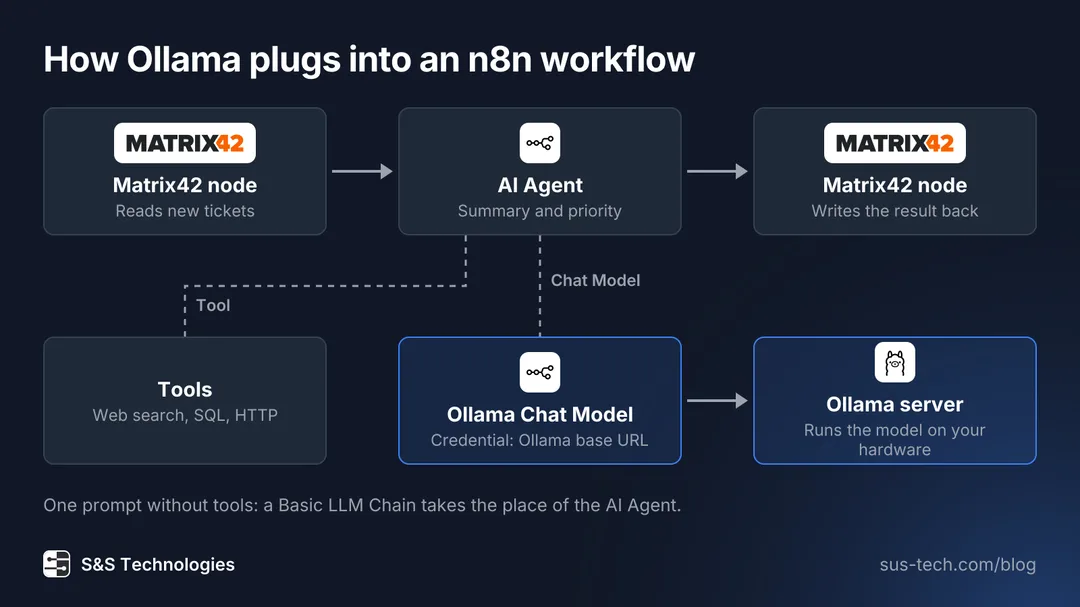
A Matrix42 node reads new tickets and hands them to the AI Agent. The agent gets its language model from the Ollama Chat Model node, which reaches the Ollama server on your hardware through the base URL in its credential. Tools such as web search, SQL or an HTTP request connect to the agent in the same way. A second Matrix42 node writes the summary and priority back into the ticket. For a single prompt without tools, a Basic LLM Chain takes the place of the agent.
Cloud and local compared
| Cloud LLM | Local Ollama + n8n | |
|---|---|---|
| Response time | Network round trip plus the queue at the provider | No round trip; depends on your GPU and the model size |
| Cost | Per token, grows with every call | Hardware once, then electricity |
| Data residency | With the provider | On-prem |
In the pilot below you measure response times and token volumes on your own workflows; they show quickly which setup fits.
A one-week pilot
One-Week Pilot Checklist
- Verify workstation or server meets GPU/RAM targets
- Install Ollama; pull Phi-3-mini and Gemma-2-9B
- Build your own workflow or Contact our team to help you get started
- Run test tickets and invoices through the new nodes
- Monitor latency and accuracy
- Decide production rollout
Want to test this with your own workflows? Contact our team to get started!