
Matrix42 Integration in n8n: S&S Technologies' n8n-nodes-matrix42

Service desks depend on speed, yet many still work with separate tools and manual look-ups. n8n offers visual, low-code orchestration while Matrix42 provides IT Service Management (ITSM) for enterprises. Combining the two lets you Automate. Optimize. Scale. - and avoid the hidden price tag we explored in The Cost of Doing Nothing.
Why Matrix42 integrations take so long
Even with Matrix42's API, teams hit three walls:
- Fragile custom connectors. Small script tweaks snowball as APIs evolve.
- AI innovation hurdles. Embedding custom AI normally requires extra middleware and risk reviews.
- Governance blind spots. Home-grown scripts rarely deliver RBAC, audit trails or GDPR assurance.
The n8n-nodes-matrix42 community node
S&S Technologies wrapped Matrix42's endpoints into the community node n8n-nodes-matrix42. Why this matters:
- Low-code productivity. Drag-and-drop beats months of scripting.
- Built-in governance. Versioning, RBAC and encrypted credentials come with n8n.
- AI-agent ready. Combine with OpenAI or Ollama blocks - and decide where to run them. Our Cloud-LLM vs Local-LLM cost comparison shows when local inference pays off.
- Small specialized models can take over routine agent tasks such as classification, as we explored in Small Language Models (SLMs): Agentic AI for Your Workflow Automation.
- GDPR-safe hosting. Need regional data sovereignty? Pair the node with an on-prem LLM gateway as outlined in GDPR-Safe Local Hosting for LLMs.
Installing and using the node
1. Installation
The node is verified by n8n. Open the nodes panel in n8n, search for Matrix42 and install it; this works on n8n Cloud as well. On a self-hosted n8n you can also install the package with npm:
npm install n8n-nodes-matrix42
After a restart of n8n you'll see the Matrix42 node.
2. Credential Setup
| Method | Fields | Notes |
|---|---|---|
| Matrix42 Webservice Token Auth | Server URL, Webservice Token, Ignore SSL Issues | The node exchanges the API token for a short-lived access token and refreshes it automatically. |
| Matrix42 Basic Auth | Server URL, User, Password, Ignore SSL Issues | Ideal for on-prem ES systems. |
3. Core Features of the Matrix42 node in n8n
- Data Fragments
- Data Objects
- Tickets
- Imports
The overview shows every resource of the node with its operations as they are named in n8n.
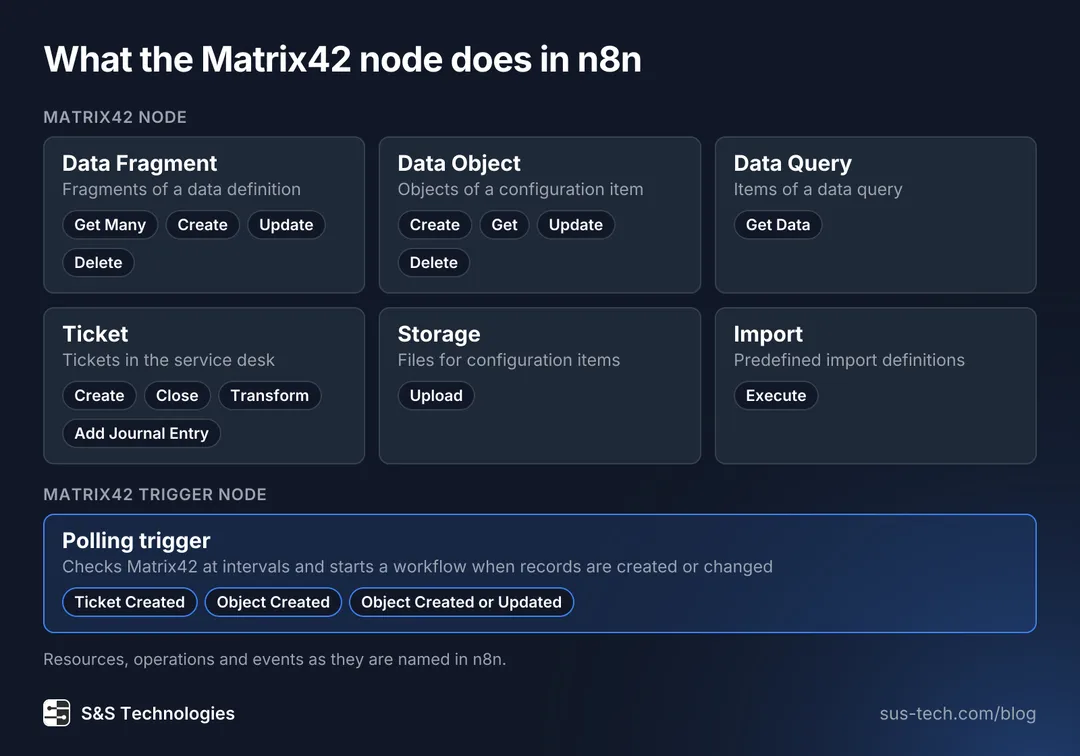
Beyond the four listed above, the node reads the items of a data query and attaches files to configuration items through Storage. A second node, the Matrix42 Trigger, checks Matrix42 at intervals and starts a workflow when a ticket is created or an object is created or changed. Both nodes come in the same package. This is the state of version 0.3.2 in October 2026.
4. End-to-End Sample
- Ticket arrives in Matrix42: unclassified with raw data.
- Matrix42 Trigger: the Ticket Created event starts the workflow with the object ID of the ticket.
- Process with AI: Local AI Agent processes the ticket, enriches the data and classifies the ticket.
- Condition Node: auto-close when duplicate is detected.
The diagram shows where each step runs.
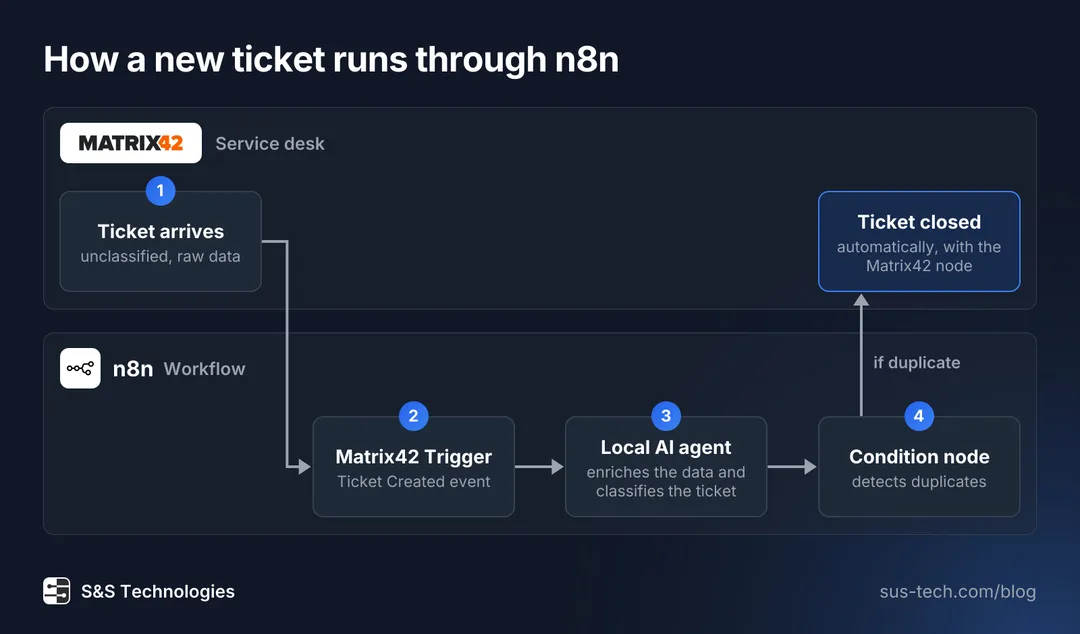
The ticket starts and ends in Matrix42. In between, n8n does the work: the Matrix42 Trigger picks up the new ticket, a local AI agent enriches and classifies the ticket and a condition node closes duplicates in Matrix42 through the Matrix42 node.
What automation with the node brings
- Faster resolution via automated enrichment and routing.
- Fewer manual steps by linking ERP, CMDB and monitoring.
- Measurable effects: a process-mining baseline shows before and after for your own tickets.
- Cost containment: Moving high-volume inference to local GPUs keeps the AI budget flat as volume grows (see cost comparison).
- Compliance confidence with GDPR-aligned, on-prem LLM deployment.
The alternative? Delay automation and pay the hidden tax outlined in The Cost of Doing Nothing.
Getting started
- Install: from the nodes panel in n8n (the node is verified by n8n) or with
npm install n8n-nodes-matrix42. - Explore GitHub: https://github.com/sus-tech-gmbh/n8n-nodes-matrix42.
- Run a PoC: Contact our team to map pain points and draft a roadmap.
Ready to orchestrate Matrix42 - and use AI agents safely and cost-effectively? S&S Technologies can help.